 Data Diary
Your day, your data — beautifully organized, privately yours.
Data Diary turns the things you notice every day — a headache, a good night's sleep, a stressful meeting, twenty minutes of stretching — into a clear picture of what's really happening over weeks and months.
Log anything in a tap. Let Data Diary surface the trends, cycles, and connections hiding in your own life. Nothing leaves your device unless you decide to share it.
Coming soon to the App Store.
- On-device onlyNo account, no cloud, no ads
- 83 ready-made metricsAcross 18 areas of life
- One-tap recordingPlus Action Button & Back Tap
- Real statisticsTrends, cycles, correlations
Step one
Decide What Matters
Think about the moments, habits, symptoms, or events you want to pay closer attention to — anything from pain spikes to piano practice to when the dog has an accident.
Most of us have a nagging question we can't quite answer: Do my headaches really get worse when I sleep badly? Is my mood better on days I exercise? Is the new routine actually helping? Memory is a poor witness. Data Diary helps you replace "I think" with "I know."
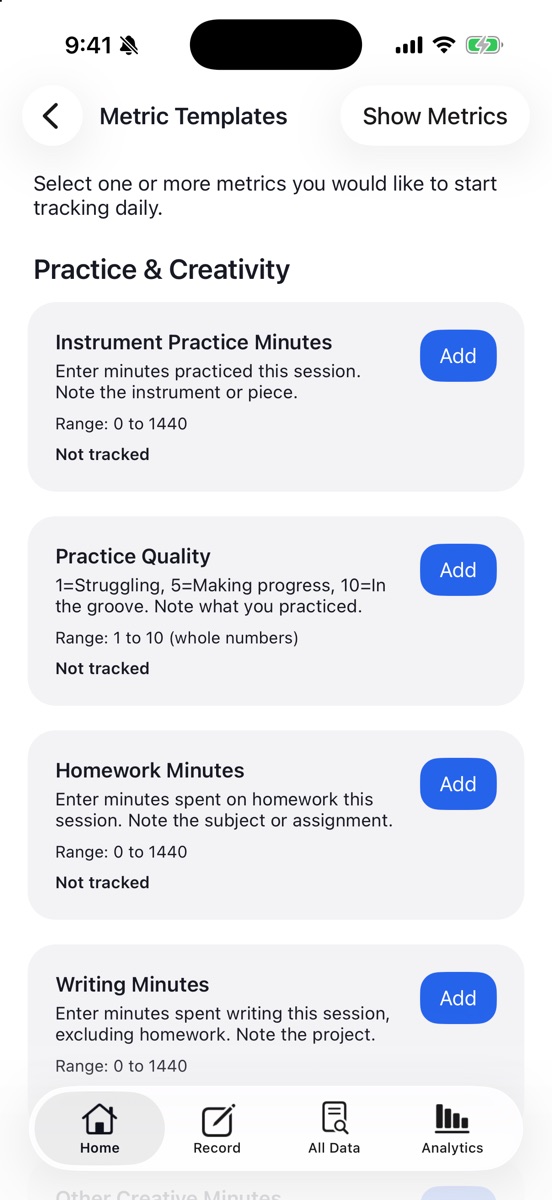
You don't have to start from a blank page. The built-in Metric Templates library offers 83 ready-to-use metrics in 18 categories — Symptoms & Flare-Ups, Mood & Emotions, Sleep, Energy & Fatigue, Stress & Triggers, Food & Reactions, Exercise & Movement, Medication & Supplements, Focus & Productivity, Pets, Home & Household, Work & Blockers, and more.
- Browse by category and add one or many metrics with a single tap.
- Every template comes with a clear scale description, so your entries stay consistent day after day.
- Change your mind any time — remove a metric from tracking just as easily.
Step two
Define Your Metrics
Turn those ideas into clear, simple data points you can capture: levels, counts, durations, or occurrences — whatever fits what you want to monitor.
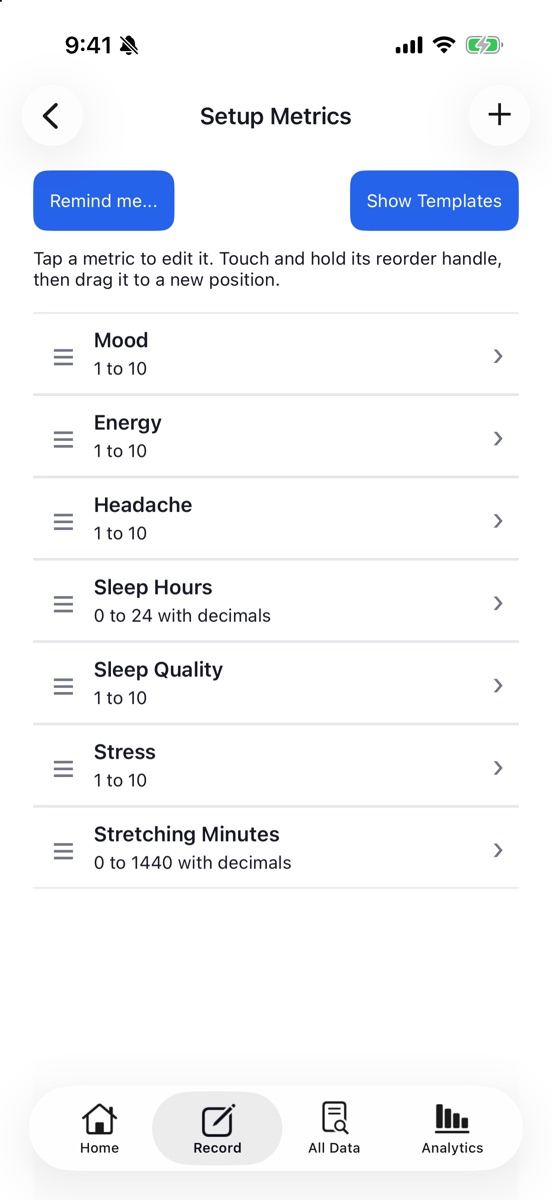
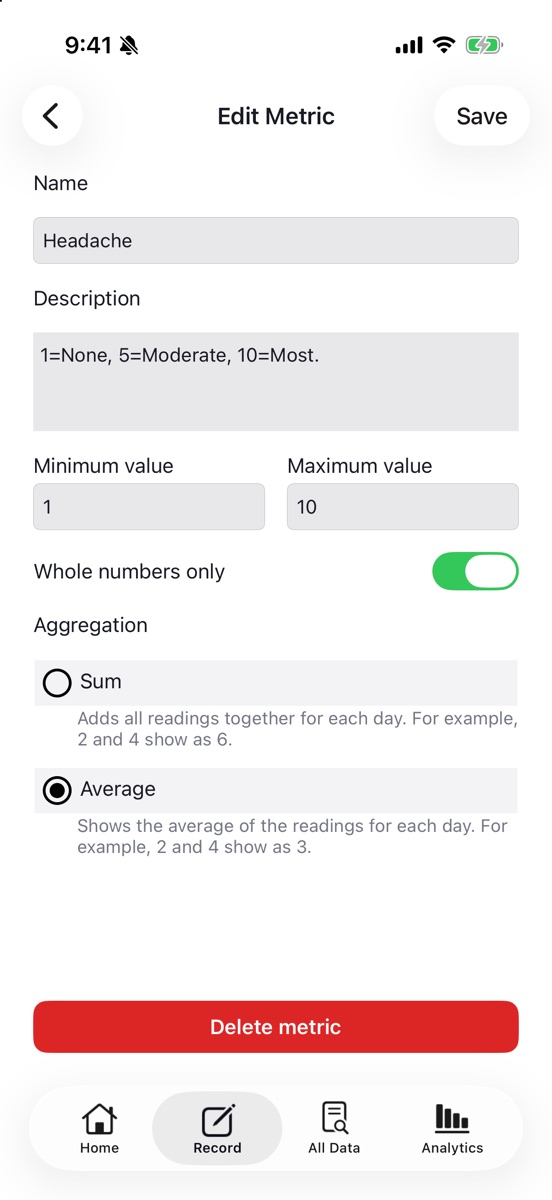
Each metric is yours to shape. Give it a name and a description that reminds you exactly what a "7" means. Set a minimum and maximum, choose whole numbers or decimals, and decide how a day's readings should combine:
- Average for levels and ratings — three mood check-ins of 6, 7, and 8 make a 7 for the day.
- Sum for counts and durations — two stretching sessions of 10 and 15 minutes make 25 for the day.
Drag metrics into the order you want to see them, and set up gentle reminders for the days and times you choose. Reminders are smart: tell Data Diary to skip the nudge if you've already logged those metrics recently.
Step three
Record It
Log entries the moment they happen. Fast, frictionless data capture designed for real‑time life.
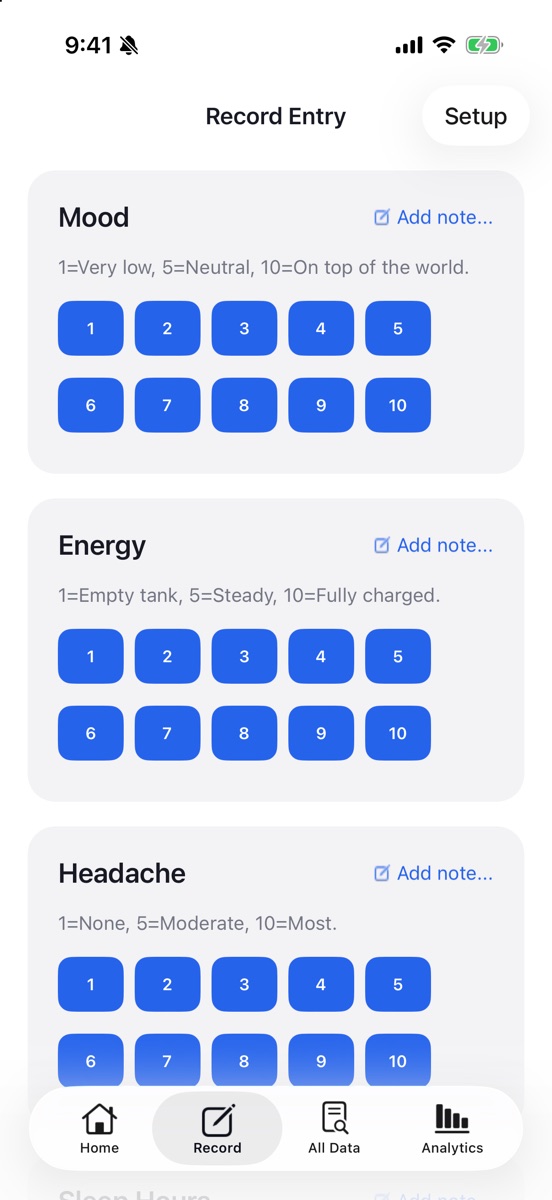
The Record screen shows every metric as a card. For rating scales, tap a big, clear number button and you're done — the entry is saved instantly with the time. For counts and durations, type a value and tap Log. Want context? Tap Add note… to jot down what you ate, what you practiced, or what might have triggered a flare-up.
- Optional location. Let Data Diary note the street and city of each entry, then rename places to friendly names like "Home," "Office," or "Gym."
- Instant Capture. Set up a shortcut for the iPhone Action Button or a double or triple Back Tap to jump straight to Record — no hunting for the app.
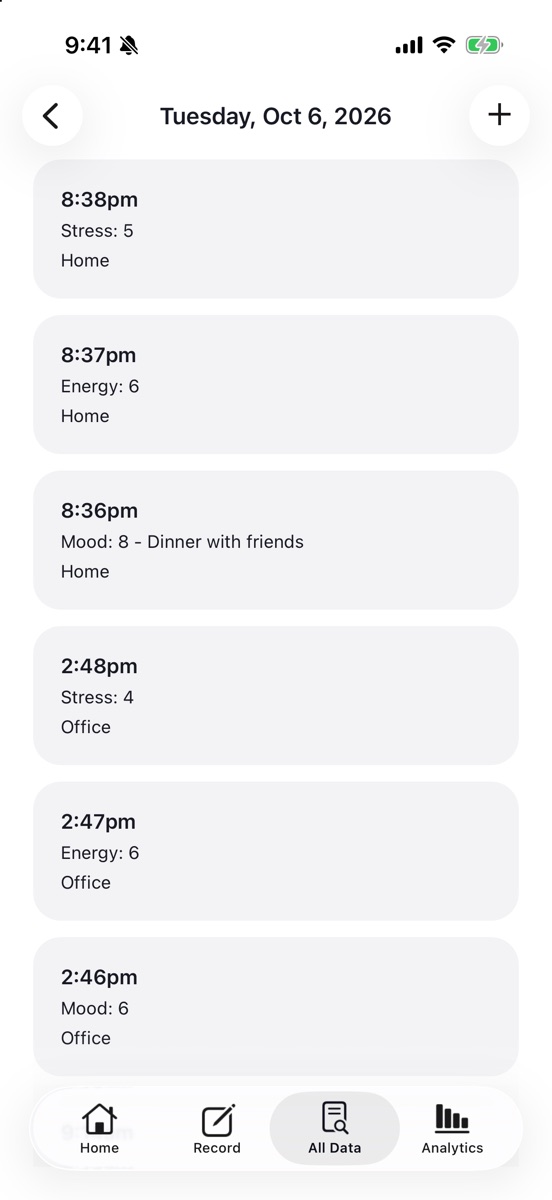
- Fix anything later. Browse every day in All Data, open any entry, and edit its value, time, or note.
"Catch the moment. Keep moving."
Step four
Explore Your Trends
See patterns, correlations, and insights that reveal what's really happening over days, weeks, or months.
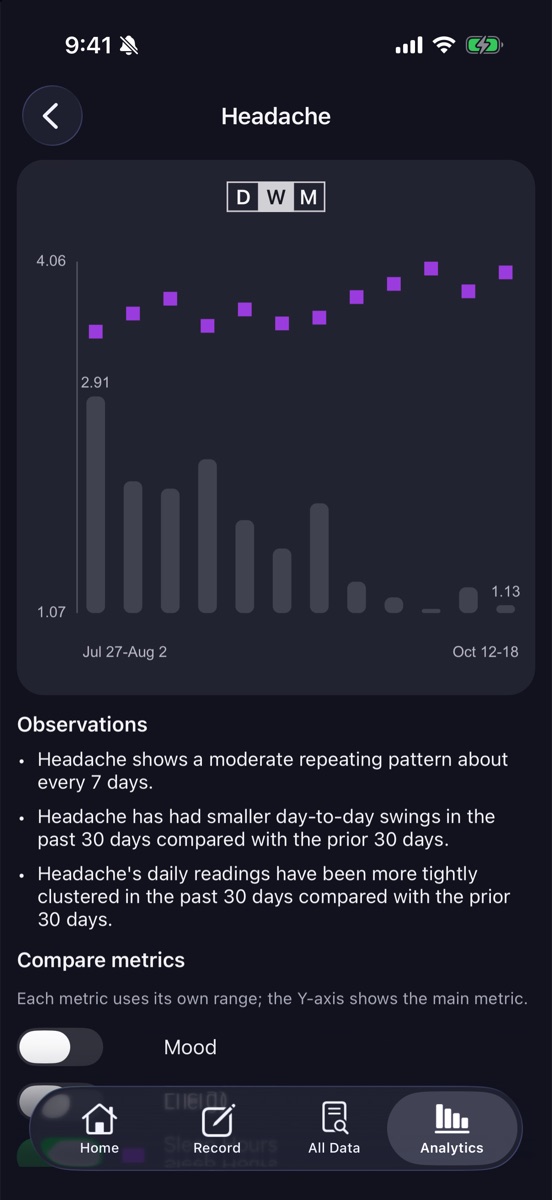
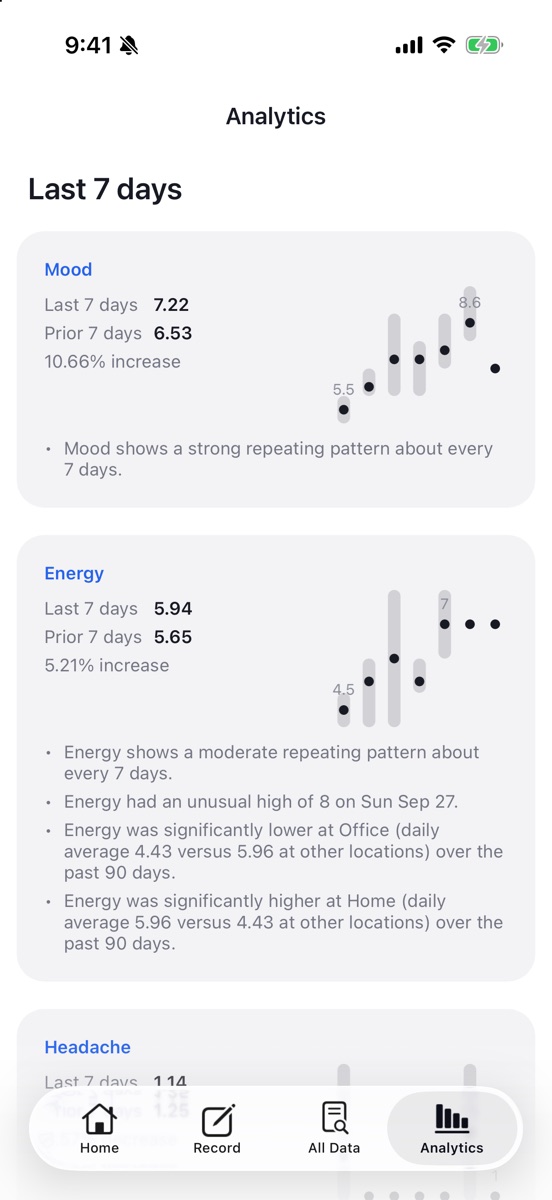
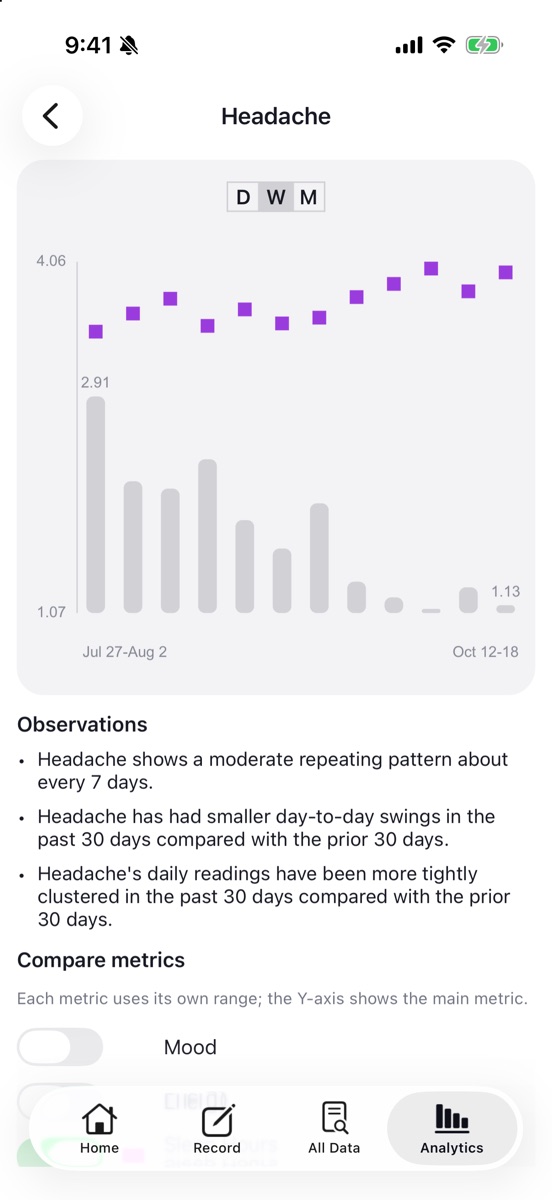
Analytics puts every metric side by side with a seven-period summary and a compact chart, so you can see at a glance what's up, what's down, and by how much. Switch between Day, Week, and Month views. Tap any metric to open a full, scrollable history — then overlay any of your other metrics to see how they move together.
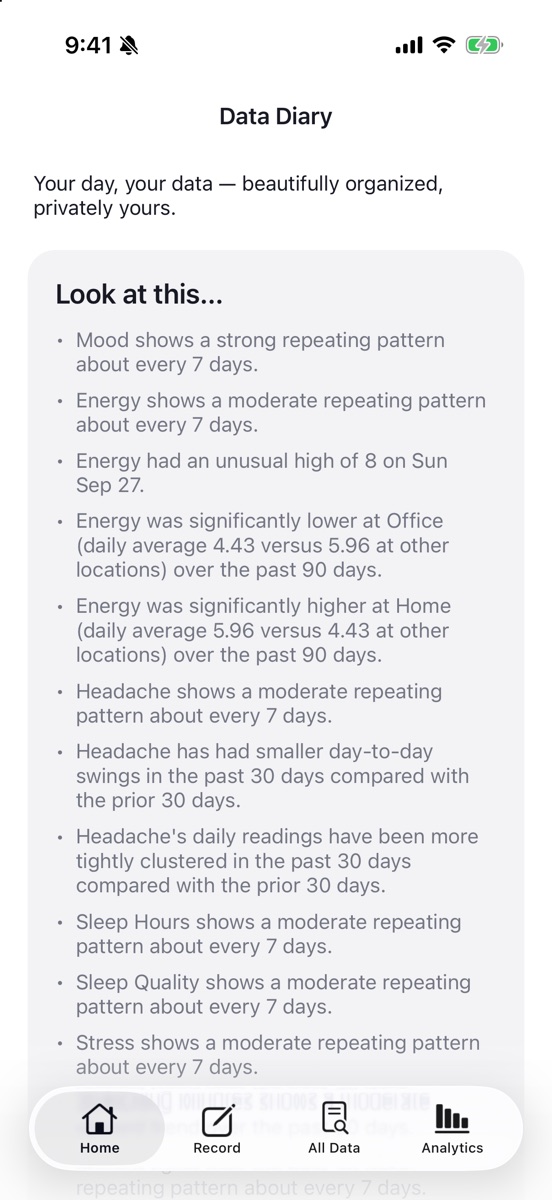
Behind the charts, Data Diary quietly runs real statistical analyses on your own data and tells you, in plain English, what stands out:
- Recent upward or downward trends.
- Repeating cycles, like a pattern that recurs about every 7 days.
- Whether day-to-day swings have calmed down or picked up.
- Unusual highs and lows, peaks and troughs.
- Differences by location — "Energy was lower at the Office."
- Correlations between metrics, including next-day effects.
The best findings surface on Home under "Look at this…". Every method is documented in the app's Statistical Methodology page. Insights are exploratory — a starting point for better questions, not a diagnosis.
Share your findings — only when you choose
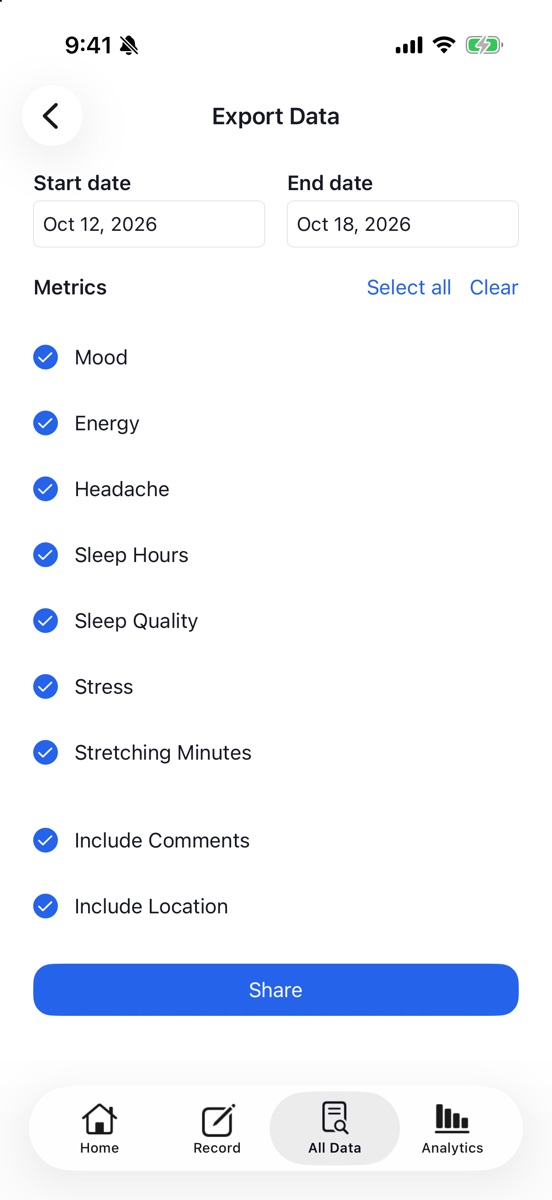
Your data is privately yours, and sharing is always your choice. Want to bring a doctor or coach into the conversation? Easily export just what you want to share. You decide what leaves your diary.
Pick a date range and the exact metrics to include, choose whether to add notes and locations, then send a clean, tab-delimited text file through the standard iOS share sheet — to Mail, Messages, Files, or any app that opens spreadsheets.
No account. No cloud sync. No advertising or tracking. Read our privacy policy.
Everything in Data Diary
A complete toolkit for tracking your life and understanding it — designed to be fast enough to use every day and private enough to trust with what matters.
Getting started
- 83 metric templates across 18 categories, from symptoms and sleep to pets and household chores.
- Quick setup — add as many templates as you like in one visit and start recording immediately.
- Guided start — the app takes you straight to the templates when you have nothing to track yet.
- Clear scale descriptions on every metric keep your ratings consistent.
- Home walkthrough explaining the Decide, Define, Record, and Explore flow.
Custom metrics
- Create your own metrics with a name, description, and minimum and maximum values.
- Whole numbers or decimals for ratings, counts, minutes, hours, and measurements.
- Sum or Average daily aggregation to match what you're measuring.
- Drag-to-reorder so your most important metrics are always on top.
- Edit or delete metrics at any time.
Fast recording
- One-tap buttons for rating scales; quick typed entry for everything else.
- Automatic timestamps on every entry.
- Notes on any entry to capture context, triggers, or details.
- Keyboard-aware layout keeps the field you're typing in visible.
- Instant Capture via Siri Shortcuts, the Action Button, or Back Tap.
- Smart reminders by weekday and time that can skip themselves if you've already logged.
Location awareness (optional)
- Street and city recorded with entries when you allow location access.
- Location aliases — rename addresses to "Home," "Office," "Gym," or anything you like.
- Location insights highlighting metrics that run higher or lower in particular places.
- Fully optional — Data Diary works perfectly with location turned off.
Your history
- All Data shows a daily summary of every metric, newest first.
- Day view lists every individual entry with its time, value, note, and place.
- Edit or delete entries, or add a missed entry after the fact.
- Remembers where you were in each tab; tap the tab again to jump back to the top.
Analytics & charts
- Day, Week, and Month grouping across Analytics and detail charts.
- Seven-period summaries with percentage change for every metric.
- Scrollable history charts that reach back through your entire diary.
- Compare metrics — overlay others on any chart, each on its own scale.
- "Look at this…" highlights of the most notable findings on Home.
Statistical insights
- Trend detection over the last 30 days.
- Cycle detection for repeating patterns from 2 to 30 days long.
- Volatility and variability changes, checked with permutation tests.
- Peaks, troughs, and outliers against a robust local baseline.
- Lagged correlations between metrics up to two days apart, with multiple-testing correction.
- Location comparisons using Welch's ANOVA and t-tests.
- Transparent methodology — every formula and threshold documented in the app.
Sharing & export
- Choose a date range and exactly which metrics to export.
- Optional notes and locations in the export.
- Tab-delimited text that opens in Numbers, Excel, and Google Sheets.
- Standard iOS share sheet — send to Mail, Messages, Files, AirDrop, and more.
Privacy & design
- All data stays on your device — no account, no cloud service, no sign-up.
- No ads, no tracking, no third-party analytics.
- Delete Everything with a double confirmation when you want a clean slate.
- Designed for iPhone and iPad, with Light and Dark Mode support.
- Modern iOS look with translucent bars and native navigation.
Start understanding your days
Data Diary is coming soon to the App Store for iPhone and iPad. Have a question or an idea? We'd love to hear from you.